Sistem tamiri için tasarlanan Gentoo tabanlı, Fransız kökenli SystemRescueCd‘nin 5.1.2 sürümü duyuruldu. Sistemin kararlı Linux çekirdeği LTS 4.9.60’a dayalı olarak geldiği bildirilirken, UEFI Önyükleme için Grub 2.02 kullanımının tercih edildiği belirtildi. Disk araçları güncellenmiş olarak gelen sistemde, sistem çekirdeği; ext2, ext3, ext4, ReiserFS, Reiser4FS, btrfs, XFS, JFS, VFAT, NTFS, ISO9660 gibi günümüzün en önemli dosya sistemlerinin tümünü ve Samba ve NFS gibi ağ dosya sistemlerini destekliyor. Gentoo tabanlı önyüklenebilir bir CD-ROM veya USB sistem olan SystemRescueCd ile yönetim görevlerini kolaylıkla yürütmek ve sabit disk bölümlerini düzenlemek mümkündür. SystemRescueCd 5.1.2 hakkında ayrıntılı bilgi edinmek için değişiklikler sayfasını inceleyebilirsiniz.
Ubuntu tabanlı, kullanıcı dostu masaüstü ve sunucu versiyonlarıyla kullanıma sunulan GNU/Linux dağıtımı Black Lab Linux’un (eski adıyla OS4 OpenLinux) 11.5 sürümünün 3. betası, Roberto J. Dohnert tarafından duyuruldu. Black Lab Enterprise Linux 11.5 Beta 3’ü duyurmaktan memnuniyet duyduklarını söyleyen Dohnert; bu sürümde, sistemde birkaç geliştirme yaptıklarını belirtti ve sürücü yetenekleri artırılan sistemin 4.10.0-38 Linux çekirdeği üzerine yapılandırılarak daha iyi bir performans elde edildiğini ifade etti. Xorg 1.18’e dayalı olarak gelen sistem; LibreOffice 5.4 ve Chromium Browser 62 içeriyor ve Thunderbird, Ice SSB, Calligra, Skype 8.9, Nitroshare, Samba4, Synergy, Audacious gibi popüler yazılımların en yeni sürümleriyle kullanıma sunuluyor. Kullanıcılara KDE Plasma 5, Xfce, LXDE ve MATE masaüstü ortamlarını deneyimleme olanağı sağlayan sistem; XFS, JFS ve Btrfs dosya sistemlerini destekliyor ve ses düzenleme, 3D render ve video düzenleme araçları içeriyor. Black Lab Enterprise Linux 11.5 Beta 3 hakkında daha ayrıntılı bilgi edinmek için sürüm duyurusunu inceleyebilirsiniz.
In the previous post, we discussed how to install Linux, now we are going to talk about the most powerful features in Linux which is Linux commands or shell commands. For the whole documentation of Linux Commands, you can check Linux Documentation. The power of Linux is in the power of commands that you can use. I’m going to talk about the main Linux commands with their main parameters that you might use daily.
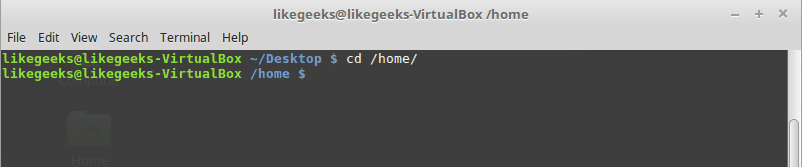
Change directory from the current directory to another one.
cd /home
Will go to home directory
cp Command
Copy the source to target.
Parameters
-i
Interactive mode means wait for the confirmation if there are files on the target will be overwritten.
-r
Recursive copy means include subdirectories if they found.
Example
cp –ir sourcedir targetdir
mv Command
Move the source to target and remove the source.
Parameters
-i
Interactive mode means wait for the confirmation if there are files on the target will be overwritten.
Example
mv –i sourceFile targetFile
rm Command
Delete file or directory and you must use –r in case you want to delete a directory.
Parameters
-r
Recursive delete means delete all subdirectories if found.
-i
Interactive means wait till confirmation
mkdir Command
Create a new directory.
mkdir newDir
rmdir Command
Delete a directory
chown Command
Change the owner of a file or directory.
Parameters:
-R
Capital R here means to change ownership of all subdirectories if found and you must use this parameter if you use the command against a directory.
chown –R root:root myDir
chmod Command
Change the permission of a file or directory.
Parameters
The mode which consists of 3 parts, owner, group, and others means what will be the permissions for these modes, and you must specify them.
The permission is one of the followings:
Read =4
Write = 2
Execute =1
Every permission represented by a number as shown and you can combine permissions.
Example
chmod 755 myfile
That means set permission for the file named myfile as follows:
owner: set it to 7 which means 4+2+1 means read+write+execute.
group: set it to 5 which means 4+1 means read+execute.
other: set it to 5 which means 4+1 means read+execute.
Note: execute for a folder permission means opening it.
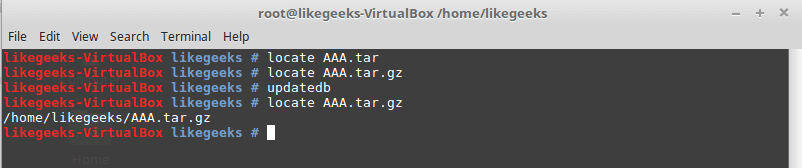
locate Command
To find a file in your system, the locate command will search the system for the pattern you provide.
locate myfile
updatedb Command
updates the database used by the locate command.
date Command
Simply prints today’s date. Just type date on the shell.
tar Command
Combines several files into archive and compression if you want.
Parameters
-c
Create new archive.
-z
Compress the archive using gzip package.
-j
Compress the archive using bzip2 package.
-v
Verbose mode means show the processed files.
-f
Write the output to a file and not to screen.
-x
Unpack files from archive.
Example
tar –czvf myfiles.tar.gz myfiles
This command will pack and compress all files in folder myfiles to a compressed archive named myfiles.tar.gz.
tar-xzvf myfiels.tar.gz
This command will decompress the archive.
cat Command
Display file content to screen without limits.
Example
cat myfile.txt
less Command
Displays file content with scroll screen so you can navigate between pages using PgUp, PgDn, Home, and End.
less myfile
grep Command
Searches for a string in the specified files and displays which line contains the matched string.
Parameters
-R
Recursive search inside subdirectories if found.
-i
Insensitive search and ignore case.
-l
Display file name, not the text lines.
Example
grep –Ril mystring /home
passwd Command
Used to change your user password.
du Command
Calculates the disk usage of a file or a directory.
Parameters
-h
Display human readable form.
-s
Summarize the output total size.
Example
du –hs /home
reboot Command
Reboot the system immediately. Just type reboot.
halt Command
Shuts down the system, but make sure to close all of your files to avoid data loss.
That was just some of the main Linux commands.
Notice that, if you forget any command parameters, just type the command with – -help as a parameter and it will list the used parameters so you don’t have to remember all those parameters at the beginning.
İlk sürüm adayı 18 Ekim 2017‘de çıkarılan LibreOffice’in 5.4.3 serisinin ikinci sürüm adayı The Document Foundation (TDF) tarafından sürüm takvimine uygun biçimde çıkarılarak kullanıma sunuldu. The Document Foundation (TDF), henüz resmi duyuruyu yapmadı ama paketler test edilmek üzere yansılardaki yerini aldı. Bunun, yalnızca test etmek amacıyla kullanıma sunulan bir sürüm olduğunun unutulmaması ve yalnızca test etmek amacıyla kullanılması gerektiği hatırlatılıyor. LibreOffice 5.4.3 RC2’yi var olan LibreOffice kurulumuna paralel kurabilirsiniz. Farklı dağıtımlar için ayrıntılı kurulum yönergelerini incelemeniz önerilir. Sürüme ilişkin hataları Bugzilla üzerinden bildirebilirsiniz. LibreOffice 5.4.3 RC2 hakkında ayrıntılı bilgi edinmek için yayımlandıktan sonra sürüm notlarını inceleyebileceksiniz.
LXDE masaüstü ortamı bünyesinde kullanıma sunulan bir terminal emülatörü olan LXTerminal’in 0.3.1 sürümü duyuruldu. Bunun bir güvenlik ve hata düzeltme güncellemesi olduğu belirtilirken, kullanılabilirliği artırmak için eklenen küçük bir özelliğin de içerikte yer aldığı ifade ediliyor. 0.3.0 sürümünden bu yana yapılan değişiklikler değişiklikler için git günlüğünün incelenebileceği belirtiliyor. 0.3.0 sürümünden bu yana devam etmekte olan sekmenin adını değiştirmeyi engeleyen bir problem de düzeltilmiş bulunuyor. LXTerminal, Lubuntu gibi varsayılan olarak LXDE masaüstü ortamını kullanan sistemlerde varsayılan varsayılan terminal konsolu olarak geliyor. LXTerminal 0.3.1 hakkında ayrıntılı bilgi edinmek için sürüm duyurusunu inceleyebilirsiniz.
İnternet üzerinde kişisel bilgileri gizleyebilme ve anonim olma olanağı sağlayan ünlü güvenlik aracı Tor Browser’in 7.5a7 sürümü duyuruldu. Bunun yalnız macOS ve Linux kullanıcıları için bir güvenlik ve düzeltme sürümü olduğu belirtilirken, bir Firefox hatası nedeniyle ihtiyaç duyulan sürümün, IP adreslerini sızdırma problemini giderdiği ifade ediliyor. Böylelikle 26 Ekim Perşembe günü Filippo Cavallarin tarafından bildirilen problemin çözümlenmiş olduğu vurgulanırken, yardımcı olan herkese teşekkür edildiği bildirildi. Konuyu merak eden kullanıcıların değişiklikler sayfasını inceleyebilecekleri belirtildi. Tor Browser 7.5a7 hakkında ayrıntılı bilgi edinmek için sürüm duyurusunu inceleyebilirsiniz.
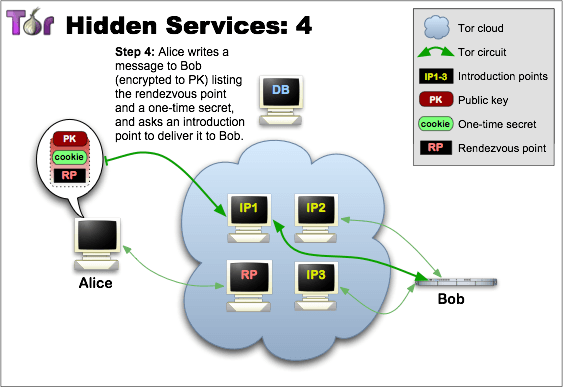
Kuşkusuz, bu trafiğin şöyle bir dezavantajı da vardır. Birçok sitenin açılması çok uzun sürebilmektedir. Ancak, kullanıcı .onion uzantılı web sitesini yayınlayarak bu sayede Tor Browser üzerinden yayınladığı siteye girişin hızlı olmasını sağlayabilir. Ayrıca bu siteye normal browserlar ile erişilemeyecektir, siteye yalnızca Tor Browser kullananlar ulaşabileceklerdir. Yani mükemmel bir şekilde gizlenmiş bir web sayfasıdır söz konusu olan. Tor Browser 7.5a7 edinmek için aşağıdaki linklerden yararlanabilirsiniz.


 Sistem tamiri için tasarlanan Gentoo tabanlı, Fransız kökenli SystemRescueCd‘nin 5.1.2 sürümü duyuruldu. Sistemin kararlı Linux çekirdeği LTS 4.9.60’a dayalı olarak geldiği bildirilirken, UEFI Önyükleme için Grub 2.02 kullanımının tercih edildiği belirtildi. Disk araçları güncellenmiş olarak gelen sistemde, sistem çekirdeği; ext2, ext3, ext4, ReiserFS, Reiser4FS, btrfs, XFS, JFS, VFAT, NTFS, ISO9660 gibi günümüzün en önemli dosya sistemlerinin tümünü ve Samba ve NFS gibi ağ dosya sistemlerini destekliyor. Gentoo tabanlı önyüklenebilir bir CD-ROM veya USB sistem olan SystemRescueCd ile yönetim görevlerini kolaylıkla yürütmek ve sabit disk bölümlerini düzenlemek mümkündür. SystemRescueCd 5.1.2 hakkında ayrıntılı bilgi edinmek için değişiklikler sayfasını inceleyebilirsiniz.


 Ubuntu tabanlı, kullanıcı dostu masaüstü ve
 In the previous post, we discussed












 İlk sürüm adayı


 İnternet üzerinde kişisel bilgileri gizleyebilme ve