

Author Archive | filozof

Important Facts Everyone Needs to Know About Blockchain technology

If you were to ask the general population what they know about blockchain technology, you wouldn’t be surprised to hear that most of them either know nothing at all or can connect the blockchain to cryptocurrencies. They wouldn’t be wrong. Cryptocurrency is, in fact, dependent upon blockchain technology and it is the technology that has paved the way for bitcoin to become possible. Without it, the world’s most famous and valuable crypto wouldn’t exist. This is because when someone makes a payment with bitcoin, the payment is authenticated as another block of information on the chain. The blockchain takes the place of a bank to keep a record of payments, but unlike a bank, there is no central authority. The decentralised nature of bitcoin, therefore, hinges on this blockchain acting as a public ledger available to all but completely secure.

Continue Reading →

Looking Further than Bitcoin and Crypto

Yet, this is not the only use for blockchain technology. Despite bitcoin relying on its blockchain, it doesn’t work in the other direction.

Blockchains are used for other purposes in other industries. Here are some examples of industries that have already tapped into the blockchain potential:

#1: The Music Industry

One issue constantly facing musicians and those involved with creating music is that they do not receive the money they are owed.

It is not unheard of that megastars are seeking compensation from other music organisations for not paying them the royalties they deserve. Copyright infringements are rife and the court cases to address these problems are just as common.

The blockchain can counter this issue by providing a traceable and publicly available set of information for each song and who is owed what royalties from it.

The same idea can be applied to other forms of art such as photography. Photographers can trace the use of their images on the blockchain and even allow experts to track the origin of a piece of art.

#2: The Automotive Industry

One issue when buying a car is that you can never be certain that what you are buying is exactly how it was advertised or sold to you.

People can tamper with the mileage on a car and get around telling you about its maintenance history. What you think is a vehicle with an excellent track record could have been used a lot more and have been in the garage frequently.

This is why some businesses in the automotive industry have adopted blockchains and are using them on some vehicles to record maintenance and mileage. This is to prevent odometer fraud and vehicles being inaccurately sold by criminals.

#3: The Sports Industry

Some sports teams are using blockchain to create their own tokens for fans to use to buy match tickets and merchandise.

This is a way of creating a currency that is valuable to a select community. The blockchain is also being used by teams to implement fair voting systems to do with player jerseys and alike.

Using blockchains to cast votes is also a topic being considered by governments to ensure secure election processes without the need for recounts.

#4: The Freight Industry

The freight industry is welcoming blockchains to streamline often complex processes and reduce the amount of paperwork required en route.

It would enable businesses to track packages across a destination as they are scanned by different workers. It was also rumored to be a solution to the backstop issue within the Brexit negotiations.

From these four examples, it is easy to spot blockchains that have more purpose that what we most associate them with. In fact, it could be argued that the hype of owning a Luno Bitcoin wallet and sending secure payments around the world faster and cheaper may be making the general population blind to the other possibilities at hand.

The truth is, understanding the facts around blockchains will help us look beyond cryptocurrencies. Here are some of the key facts you may not know about blockchains already.

Blockchain Also Has a Place in Science

Thanks to grants and our natural thirst for knowledge, the scientific community has been able to amass a wealth of studies that help improve policies and inform public services.

However, scientists often come stuck when they try to replicate studies to authenticate results further, or tweak studies to find out more (and further our knowledge).

This happens because the original study’s data is not publicly available or easy to access. The blockchain could help in this matter by being the place where data is stored for scientific study.

Researchers across the globe could access a public ledger of data to conduct studies that other research has been based on, allowing future results to accurately verify information or increase our understanding.

Consider how many times two different researching teams have conflicting views about the same subject. The conflict may arise due to a difference in the quality or amount of data.

Blockchain technology holding the same data set would allow all research parties to research from the same information. Although this would help scientific groups to collaborate and progress with findings, it does also call for high-quality data to be used.

Blockchain as the Answer to ID Verification

Verifying our identity has become part and parcel of modern life. It is not just airports where we have to dig out our passport, but also gyms, libraries and any other time we sign up for a membership or service.

This can be time-consuming and inconvenient, especially when each vendor wants a different type of ID or a different combination of documentation.

Although blockchain has yet to be used in this way. There is potential for blockchain to be a solution and give every citizen of a country – or a group of countries that opt into the strategy – to record personal information and their identity on the blockchain.

This would make ID verification seamless in certain locations.

EU citizens already have something similar to this with their information stored on a chip placed on their ID card. An upgraded version of this on the blockchain could be the answer, with healthcare professionals having access to this in the event of an emergency.

Soon You May Be Buying Blockchain-Based Products

The idea that blockchain technologies will be most used by businesses is not true. Yes, many businesses will adopt the technology, but the technology will also be placed in the hands of the consumer.

This is because products are also going to be made with blockchain technology powering them – and it is already happening.

Some smartphone developers have already made blockchain smartphones. Other products that are in lien to be developed include devices around the home that recolonise the way we live.

What we are referring to is devices classed within the Internet of Things (IoT)

These devices will be connected and change how we do tasks and chores at home. They will also be connected to do so, such as telling a small device in the corner that you want to watch Netflix or to turn the dishwasher on.

The problem when lots of devices are connected is that they make you more vulnerable to hackers.

Blockchains can prevent hacks and protect your data by securing your at-home network on IoT devices. Methods of combining the two are already been worked on to keep consumers safe and their data protected.

Other Facts You Should Know About Blockchain Technology

The potential for blockchain has now been well established, but what has it already achieved? Here are some shorter facts about the technology that not a lot of people realize:

  1. The person(s) who made blockchains famous and bitcoin inventor, Satoshi Nakamoto, is unknown. People have suggested the person behind the revolution to be certain individuals, but the actual identity of the person responsible remains a mystery.
  2. Blockchains do not have to be public. They can also be private, somewhat like an intranet within a business. This is what enables them to function as a source of ID without compromising on data privacy laws.
  3. It is estimated that blockchain development is at the stage the internet was at around two decades ago. Considering this and what it has achieved so far perfectly illustrates the potential blockchain technology encompasses.
  4. Blockchains are relatively untouched. Around half of the world’s population use the internet and around 0.05% of us are using blockchains. This number will rise when more businesses adopt the technology.
  5. Conventional banks are now seeking blockchains to help with their own processes. What was once a tool against fiat financial systems is now being used within them. This may make some crypto enthusiasts weep a little.
  6. A Blockchain is at its most secure stage when it is first created. Many people assume that the blockchain will become more secure in time, but this is not the case.

It Doesn’t Mean We Should Forget about Cryptos

Just because the success of blockchain technology is not tied to cryptocurrency doesn’t mean we should forget about them. Cryptocurrencies, as well as digital tokens, ICOs and smart contracts,  are all the biggest successes of blockchain to date.

The benefits of cryptocurrency are huge, with faster, cheaper and more convenient payments becoming available worldwide.

This has a significantly positive impact on unbanked populations who do not have access to a bank account. For people sending money home to underdeveloped countries, they can send more money without incurring fees or time delays.

These glimpses into cryptocurrency’s power to dustups the financial status-quo should not be forgotten as other developments occur.

What Will Blockchains Do to the Job Market?

Technology and the internet, in particular, has had a significant impact on the job market in the developed world. Many jobs were replaced with machines that could do the work just as efficiently and many of these jobs were taken up by the working classes.

The same could happen once blockchain technology reaches its golden period. Many jobs may be displaced due to businesses utilising blockchains.

For example, earlier it was discussed that freight companies may use blockchains to streamline shipping processes. There is a strong chance that this development could put some workers out of a job.

Jobs may be lost due to blockchain, and they may be lost more in manual professions. However, the blockchain may also create lots of new jobs that are not around today. Most of these jobs will be directed at tech-savvy types and us geeks.

So, Should You Invest in Blockchain Startups?

There are so many positive noises coming from industries and businesses that are using blockchains. Yet, it is crucial to realise that this trend is new.

No doubt there are investment opportunities to be secured with blockchain B2B businesses, but are the right investments with blockchain startups?

The answer may be yes, but it may be smarter to invest your money in established technology companies who already own a strong market share.

Blockchains can be made for everyone and choosing a small startup may not guarantee you success. Placing your investment with companies who are actively looking at blockchains and already have a foothold in their market could be the wiser move.

The Takeaway Fact to Remember

There is a chance that you learned a lot about blockchains in this post, but you are not likely to retain everything you learned. If you need one fact about blockchain technology to leave with – and the most important one. It is that blockchains cannot be ignored.

They are a key player in the fourth industrial revolution and in that sense, they are exceptionally disruptive to all current technology.

Consider blockchains to be the puppet masters of the future of the tech and many other industries. It may just take a little while for the curtain to be pulled back completely.


0

Full Circle Magazine Weekly News 160 duyuruldu

Ubuntu Linux topluluğu tarafından çıkarılan özgür ve bağımsız bir dergi olan Full Circle Magazine‘in Weekly News’in 160. sayısı duyuruldu. Yeni sayı; Zorin OS 15.1 çıktı, Firefox 71 artık desteklenen tüm Ubuntu sürümlerinde kullanıma hazır, KDE’nin Aralık 2019 uygulama güncellemesi, Oracle Virtualbox 6.1 kullanıma sunuldu, Microsoft Teams artık Linux için hazır, DXVK bakım moduna giriyor gibi dolu bir içerikle geliyor. Dergide ayrıca; haberler, hikayem, günlük yürüyüş, sorular ve cevaplar, bulmaca gibi bölümler de bulunuyor. Full Circle Magazine Weekly News 160 içeriğine ilişkin olarak buradan yararlanabilirsiniz.

Continue Reading →

Full Circle Magazine Weekly News 160 edinmek için yayımlandığı zaman aşağıdaki linkten yararlanabilirsiniz.

0

SSH port forwarding (tunneling) in Linux

In this tutorial, we will cover SSH port forwarding in Linux. This is a function of the SSH utility that Linux administrators use to create encrypted and secure relays across different systems. SSH port forwarding, also called SSH tunneling, is used to create a secure connection between two or more systems. Applications can then use these tunnels to transmit data. Your data is only as secure as its encryption, which is why SSH port forwarding is a popular mechanism to use. Read on to find out more and see how to setup SSH port forwarding on your own systems. To put it simply, SSH port forwarding involves establishing an SSH tunnel between two or more systems and then configuring the systems to transmit a specified type of traffic through that connection.

Continue Reading →

What is SSH port forwarding?

To put it simply, SSH port forwarding involves establishing an SSH tunnel between two or more systems and then configuring the systems to transmit a specified type of traffic through that connection.

There are a few different things you can do with this: local forwarding, remote forwarding, and dynamic port forwarding. Each configuration requires its own steps to setup, so we will go over each of them later in the tutorial.

Local port forwarding is used to make an external resource available on the local network. An SSH tunnel is established to a remote system, and traffic from the local network can use that tunnel to transmit data back and forth, accessing the remote system and network as if it was a part of the local network.

Remote port forwarding is the exact opposite. An SSH tunnel is established but the remote system is able to access your local network.

Dynamic port forwarding sets up a SOCKS proxy server. You can configure applications to connect to the proxy and transmit all data through it. The most common use for this is for private web browsing or to make your connection seemingly originate from a different country or location.

SSH port forwarding can also be used to setup a virtual private network (VPN). You’ll need an extra program for this called sshuttle. We cover the details later in the tutorial.

Why use SSH port forwarding?

Since SSH creates encrypted connections, this is an ideal solution if you have applications that transmit data in plaintext or use an unencrypted protocol. This holds especially true for legacy applications.

It’s also popular to use it for connecting to a local network from the outside. For example, an employee using SSH tunnels to connect to a company’s intranet.

You may be thinking this sounds like a VPN. The two are similar, but creating ssh tunnels is for specific traffic, whereas VPNs are more for establishing general connections.

SSH port forwarding will allow you to access remote resources by just establishing an SSH tunnel. The only requirement is that you have SSH access to the remote system and, ideally, public key authentication configured for password-less SSHing.

How many sessions are possible?

Technically, you can specify as many port forwarding sessions as you’d like. Networks use 65,535 different ports, and you are able to forward any of them that you want.

When forwarding traffic, be cognizant of the services that use certain ports. For example, port 80 is reserved for HTTP. So you would only want to forward traffic on port 80 if you intend to forward web requests.

The port you forward on your local system doesn’t have to match that of the remote server. For example, you can forward port 8080 on localhost to port 80 on the remote host.

If you don’t care what port you are using on the local system, select one between 2,000 and 10,000 since these are rarely used ports. Smaller numbers are typically reserved for certain protocols.

Local forwarding

Local forwarding involves forwarding a port from the client system to a server. It allows you to configure a port on your system so that all connections to that port will get forwarded through the SSH tunnel.

Use the -L switch in your ssh command to specify local port forwarding. The general syntax of the command is like this:

ssh -L local_port:remote_ip:remote_port [email protected]

Check out the example below:

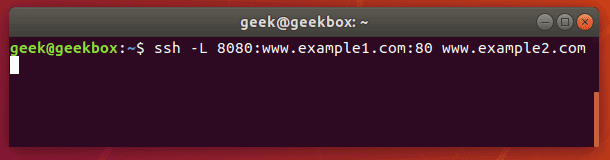
ssh -L 80:example1.com:80 example2.com

local port forwarding

This command would forward all requests to example1.com to example2.com. Any user on this system that opens a web browser and attempts to navigate to example1.com will, in the background, have their request sent to example2.com instead and display a different website.

Such a command is useful when configuring external access to a company intranet or other private network resources.

Test SSH port forwarding

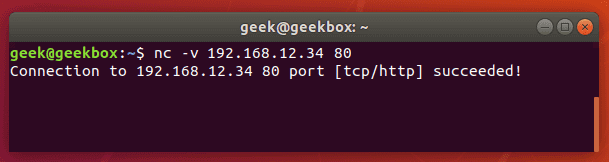
To see if your port forwarding is working correctly, you can use the netcat command. On the client machine (the system where you ran the ssh -L command), type the netcat command with this syntax:

nc -v remote_ip port_number

Test port forwarding using netcat

If the port is forwarded and data is able to traverse the connection successfully, netcat will return with a success message. If it doesn’t work, the connection will time out.

If you’re having trouble getting the port forwarding to work, make sure you’re able to ssh into the remote server normally and that you have configured the ports correctly. Also, verify that the connection isn’t being blocked by a firewall.

Persistent SSH tunnels (Using Autossh)

Autossh is a tool that can be used to create persistent SSH tunnels. The only prerequisite is that you need to have public key authentication configured between your systems, unless you want to be prompted for a password every time the connection dies and is reestablished.

Autossh may not be installed by default on your system, but you can quickly install it using apt, yum, or whatever package manager your distribution uses.

sudo apt-get install autossh

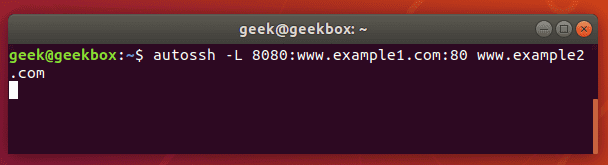
The autossh command is going to look pretty much identical to the ssh command we ran earlier.

autossh -L 80:example1.com:80 example2.com

Persistent SSH port forwarding autossh

Autossh will make sure that tunnels are automatically re-established in case they close because of inactivity, remote machine rebooting, network connection being lost, etc.

Remote forwarding

Remote port forwarding is used to give a remote machine access to your system. For example, if you want a service on your local computer to be accessible by a system(s) on your company’s private network, you could configure remote port forwarding to accomplish that.

To set this up, issue an ssh command with the following syntax:

ssh -R remote_port:local_ip:local_port [email protected]

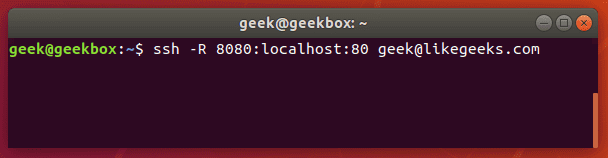
If you have a local web server on your computer and would like to grant access to it from a remote network, you could forward port 8080 (common http alternative port) on the remote system to port 80 (http port) on your local system.

ssh -R 8080:localhost:80 [email protected]

Remote port forwarding

Dynamic forwarding

SSH dynamic port forwarding will make SSH act as a SOCKS proxy server. Rather than forwarding traffic on a specific port (the way local and remote port forwarding do), this will forward traffic across a range of ports.

If you have ever used a proxy server to visit a blocked website or view location-restricted content (like viewing stuff on Netflix that isn’t available in your country), you probably used a SOCKS server.

It also provides privacy, since you can route your traffic through a SOCKS server with dynamic port forwarding and prevent anyone from snooping log files to see your network traffic (websites visited, etc).

To set up dynamic port forwarding, use the ssh command with the following syntax:

ssh -D local_port [email protected]

So, if we wanted to forward traffic on port 1234 to our SSH server:

ssh -D 1234 [email protected]

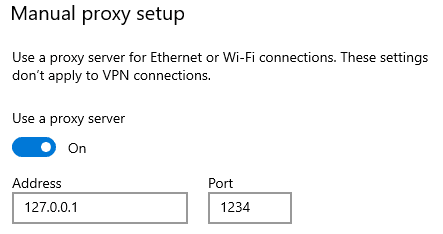
Once you’ve established this connection, you can configure applications to route traffic through it. For example, on your web browser:

Socks proxy

Type the loopback address (127.0.0.1) and the port you configured for dynamic port forwarding, and all traffic will be forwarded through the SSH tunnel to the remote host (in our example, the likegeeks.com SSH server).

Multiple forwarding

For local port forwarding, if you’d like to setup more than one port to be forwarded to a remote host, you just need to specify each rule with a new -L switch each time. The command syntax is like this:

ssh -L local_port_1:remote_ip:remote_port_1 -L local_port_2:remote_ip:remote_port2 [email protected]

For example, if you want to forward ports 8080 and 4430 to 192.168.1.1 ports 80 and 443 (HTTP and HTTPS), respectively, you would use this command:

ssh -L 8080:192.168.1.1:80 -L 4430:192.168.1.1:443 [email protected]

For remote port forwarding, you can setup more than one port to be forwarded by specifying each new rule with the -R switch. The command syntax is like this:

ssh -R remote_port1:local_ip:local_port1 remote_port2:local_ip:local_port2 [email protected]

List port forwarding

You can see what SSH tunnels are currently established with the lsof command.

lsof -i | egrep '\<ssh\>'

SSH tunnels

In this screenshot, you can see that there are 3 SSH tunnels established. Add the -n flag to have IP addresses listed instead of resolving the hostnames.

lsof -i -n | egrep '\<ssh\>'

SSH tunnels n flag

Limit forwarding

By default, SSH port forwarding is pretty open. You can freely create local, remote, and dynamic port forwards as you please.

But if you don’t trust some of the SSH users on your system, or you’d just like to enhance security in general, you can put some limitations on SSH port forwarding.

There are a couple of different settings you can configure inside the sshd_config file to put limitations on port forwarding. To configure this file, edit it with vi, nano, or your favorite text editor:

sudo vi /etc/ssh/sshd_config

PermitOpen can be used to specify the destinations to which port forwarding is allowed. If you only want to allow forwarding to certain IP addresses or hostnames, use this directive. The syntax is as follows:

PermitOpen host:port

PermitOpen IPv4_addr:port

PermitOpen [IPv6_addr]:port

AllowTCPForwarding can be used to turn SSH port forwarding on or off, or specify what type of SSH port forwarding is permitted. Possible configurations are:

AllowTCPForwarding yes #default setting

AllowTCPForwarding no #prevent all SSH port forwarding

AllowTCPForwarding local #allow only local SSH port forwarding

AllowTCPForwarding remote #allow only remote SSH port forwarding

To see more information about these options, you can check out the man page:

man sshd_config

Low latency

The only real problem that arises with SSH port forwarding is that there is usually a bit of latency. You probably won’t notice this as an issue if you’re doing something minor, like accessing text files or small databases.

The problem becomes more apparent when doing network intensive activities, especially if you have port forwarding set up as a SOCKS proxy server.

The reason for the latency is because SSH is tunneling TCP over TCP. This is a terribly inefficient way to transfer data and will result in slower network speeds.

You could use a VPN to prevent the issue, but if you are determined to stick with SSH tunnels, there is a program called sshuttle that corrects the issue. Ubuntu and Debian-based distributions can install it with apt-get:

sudo apt-get install sshuttle

If you package manager on your distribution doesn’t have sshuttle in its repository, you can clone it from GitHub:

git clone https://github.com/sshuttle/sshuttle.git

cd sshuttle

./setup.py install

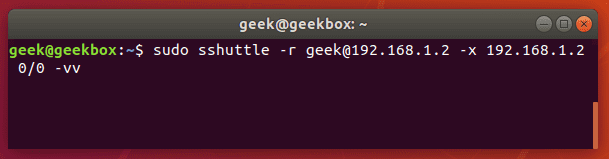
Setting up a tunnel with sshuttle is different from the normal ssh command. To setup a tunnel that forwards all traffic (akin to a VPN):

sudo sshuttle -r user@remote_ip -x remote_ip 0/0 -vv

sshuttle command

Break the connection with a ctrl+c key combination in the terminal. Alternatively, to run the sshuttle command as a daemon, add the -D switch to your command.

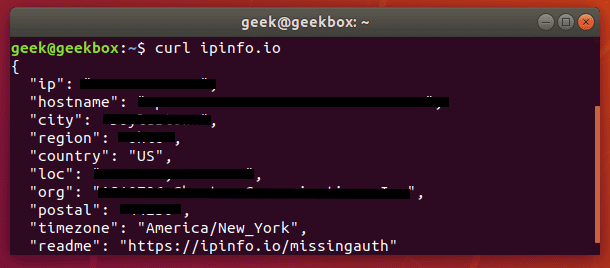
Want to make sure that the connection was established and the internet sees you at the new IP address? You can run this curl command:

curl ipinfo.io

curl IP address

I hope you find the tutorial useful. Keep coming back.

0

AcademiX GNU/Linux 2.4 duyuruldu

İlkokuldan üniversiteye kadar tüm eğitim seviyelerinde kullanılabilen yazılımlarla çalışan ve Debian GNU/Linux‘un kararlı sürümü üzerine yapılandırılan AcademiX GNU/Linux‘un 2.4 sürümü duyuruldu. 4.19.0-6 Linux çekirdeği üzerine yapılandırılan yeni sürüme yeni eğitsel paketler eklenmiş bulunuyor. Sistem; gmat-installer, coppelia-dersleri, coppeliasim oyunculu-yükleyici, komodo, therion, blender (2.81), blender-dersleri, virtualbow, android-studio-ide gibi pek çok olanakla birlikte kullanıma sunuluyor. Matematik, fizik, kimya, coğrafya, biyoloji, istatistik, elektronik, amatör radyo, grafik, ofis, programlama gibi alanlarda sanal etkileşimli laboratuvarların eşlik ettiği çeşitli uygulamaları yüklemek için kullanılabilecek bir kurulum yardımcı programı (EDU olarak adlandırılır) içeren sistem; varsayılan olarak MATE masaüstünü kullanıyor. AcademiX GNU/Linux; tüm eğitim seviyeleri için çok çeşitli açık kaynak kodlu uygulamalarla birlikte geliyor. Sistem hem eski 32 bit makineleri hem de modern 64 bit bilgisayarları destekliyor. AcademiX GNU/Linux 2.4 hakkında ayrıntılı bilgi edinmek için sürüm duyurusunu inceleyebilirsiniz.

Continue Reading →

AcademiX GNU/Linux 2.4 edinmek için aşağıdaki linkten yararlanabilirsiniz.

0

BlackArch Linux 2020.01.01 duyuruldu

Penetrasyon testleri ve güvenlik araştırmacıları için tasarlanmış Arch Linux tabanlı bir dağıtım olan BlackArch Linux’un 2020.01.01 sürümü, Levon Kayan tarafından duyuruldu. Yeni BlackArch Linux ISO ve OVA kalıplarının yayınlanlandığını belirten Kayan; tüm paket ve araçlarla ilgili birçok iyileştirme yapıldığını ve çok sayıda QA geçtiğini söyledi. LXDM’ye terminus yazı tipi desteğinin eklendiğini söyleyen Kayan; can sıkıcı ‘menü aracılığıyla araçlar açılamıyor’ hatasının düzeltildiğini ve sisteme 120 yeni araç kazandırıldığını ifade etti. 5.4.6 Linux çekirdeği üzerine yapılandırılan sistemin BlackArch yükleyicisi 1.1.34 sürümüne güncellendi. Yeni vim eklentisi eklenen sistemde; yapılandırma dosyaları da dahil olmak üzere tüm BlackArch araçları ve paketleri, ayrıca, tüm sistem paketleri güncellenmiş bulunuyor. Sistemde, tüm pencere yöneticisi menüleri de (Awesome, Fluxbox, Openbox) güncellenmiş. BlackArch Linux 2020.01.01 hakkında ayrıntılı bilgi edinmek için projenin blog sayfasını inceleyebilirsiniz.

Continue Reading →

BlackArch Linux 2020.01.01 edinmek için aşağıdaki linklerden yararlanabilirsiniz.

0

Cinnamon 4.4.6 duyuruldu

Gelişmiş yenilikçi özellikler sunan, buna karşın, geleneksel kullanıcı deneyimini de bir biçimde sürdüren ve Linux Mint tarafından geliştirilen Cinnamon masaüstü ortamının 4.4.6  sürümü duyuruldu. Clement Lefebvre tarafından github.com üzerinden duyurulan yeni sürüm, böylelikle kullanıma sunulmuş oldu. Sürümde 2 dosya değişikliği, 20 ekleme ve 1 silme işleminin gerçekleştirildiği bildiriliyor. Sürümün çıkarılmasına ilişkin olarak tüm ekip ve geliştiriciler adına duyulan mutluluk ifade edilirken, kullanıcıların çeşitli geliştirme ve yeniliklerle gelen yeni sürümle ilgili olarak tespit ettikleri ayrıntılarının geribildirimi konusunda tereddüt etmemeleri rica edildi. Cinnamon 4.4.6 sürümü hakkında ayrıntılı bilgi edinmek için değişiklikler sayfasını inceleyebilirsiniz.

Continue Reading →

Cinnamon 4.4.6 sürümünü edinmek için aşağıdaki linkten yararlanabilirsiniz.

0

Wine-Staging 5.0-RC3 duyuruldu

Wine’in 5.0-RC3 sürümünün duyurulmasından hemen sonra, Wine-Staging’in 5.0-RC3 sürümü de Alistair Leslie-Hughes tarafından duyuruldu. Henüz geliştirme aşamasına gelmemiş hata düzeltmelerini ve özellikleri ele alan ve winehq.org‘un bir test alanı olan Wine Staging‘in yeni sürümünde, 2 değişiklik, 2 ekleme ve 2 silme işlemi gerçekleştirilmiş bulunuyor. Yazılım, Overwatch ve StarCitizen gibi oyunların yanı sıra çalışan veya büyük ölçüde geliştirilmiş girdi işlemeyi gören diğer oyunlar için ham girdi desteği sağlıyor. Wine-Staging 5.0-RC3, aynı zamanda birkaç daha az bilinen oyun, başlangıç dsdmo.dll desteği ve o zamanki oyunları etkileyen on iki yıllık bir hata raporu da dahil olmak üzere diğer DirectSound çalışmaları için kilitlenme düzeltmelerini içeriyor. Wine-Staging 5.0-RC3 hakkında daha ayrıntılı bilgi edinmek için GitHub üzerindeki değişiklikler sayfasını inceleyebilirsiniz.

Continue Reading →

Wine-Staging 5.0-RC3 edinmek için aşağıdaki linkten yararlanabilirsiniz.

0