

 If you want to process large files using PHP, you may use some of the ordinary PHP functions like file_get_contents() or file() which has a limitation when working with very large files. These functions rely on the memory_limit setting in php.ini file, you may increase the value but these functions still are not suitable for very large files because these functions will put the entire file content into memory at one point. Any file that has a size larger than memory_limit setting will not be loaded into memory, so what if you have 20 GB file and you want to process it using PHP? Another limitation is the speed of producing output. Let’s assume that you will accumulate the output in an array then output it at once which gives a bad user experience. For this limitation, we can use the yield keyword to generate an immediate result.
SplFileObject Class
In this post, we will use the SplFileObject class which is a part of Standard PHP Library.
For our demonstration, I will create a class to process large files using PHP.
The class will take the file name as input to the constructor:
class BigFile
{
protected $file;
public function __construct($filename, $mode = "r")
{
if (!file_exists($filename)) {
throw new Exception("File not found");
}
$this->file = new SplFileObject($filename, $mode);
}
}
Now we will define a method for iterating through the file, this method will use fgets() function to read one line at a time.
You can create another method that uses fread() function.
Read Text Files
The fgets() is suitable for parsing text files that include line feeds while fread() is suitable for parsing binary files.
protected function iterateText()
{
$count = 0;
while (!$this->file->eof()) {
yield $this->file->fgets();
$count++;
}
return $count;
}
This function will be used to iterate through lines of text files.
Read Binary Files
Another function which will be used for parsing binary files:
protected function iterateBinary($bytes)
{
$count = 0;
while (!$this->file->eof()) {
yield $this->file->fread($bytes);
$count++;
}
}
Read in One Direction
Now we will define a method that will take the iteration type and return NoRewindIterator instance.
We use the NoRewindIterator to enforce reading in one direction.
public function iterate($type = "Text", $bytes = NULL)
{
if ($type == "Text") {
return new NoRewindIterator($this->iterateText());
} else {
return new NoRewindIterator($this->iterateBinary($bytes));
}
}
Now the entire class will look like this:
class BigFile
{
protected $file;
public function __construct($filename, $mode = "r")
{
if (!file_exists($filename)) {
throw new Exception("File not found");
}
$this->file = new SplFileObject($filename, $mode);
}
protected function iterateText()
{
$count = 0;
while (!$this->file->eof()) {
yield $this->file->fgets();
$count++;
}
return $count;
}
protected function iterateBinary($bytes){
$count = 0;
while (!$this->file->eof()) {
yield $this->file->fread($bytes);
$count++;
}
}
public function iterate($type = "Text", $bytes = NULL)
{
if ($type == "Text") {
return new NoRewindIterator($this->iterateText());
} else {
return new NoRewindIterator($this->iterateBinary($bytes));
}
}
}
Parse large Files
Let’s test our class:
$largefile = new BigFile("file.csv");
$iterator = $largefile->iterate("Text"); // Text or Binary based on your file type
foreach ($iterator as $line) {
echo $line;
}
This class should read any large file without limitations Great!!
You can use this class in your Laravel projects by autoloading your class and add it to composer.json file.
Now you can parse and process large files using PHP easily.
Keep coming back.
Thank you.

 Güçlü bir x86 ve AMD64/Intel64 sanallaştırma ürünü olan
 Kullanıcı dostu, Ubuntu tabanlı, düşük
 Many websites give their users a custom subdomain for their profiles or pages, so instead of accessing the user’s profile at http://website.com/users/50, the user can access his profile page at http://username.website.com which is much better. In this post, we will see how to make dynamic Laravel subdomain routing easily. First you need to configure DNS. For this, You must have access to DNS server settings and apache web server settings. First, you need to add an A record with an asterisk for the subdomain like this: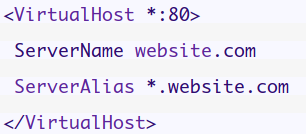
 Kod adı “Cosmic Cuttlefish” olan ve
  DebConf19, 27 Temmuz 2019 Cumartesi günü sona erdi. 50’den fazla ülkeden 380’den fazla katılımcıya ev sahipliği yapan DebConf19; 145 etkinlik görüşmesi ve tartışma oturumuyla başarılı bir biçimde sona erdi. Konferans, 14 Temmuz – 19 Temmuz tarihleri arasında gerçekleşen yıllık DebCamp ile gerçekleştirildi. DebConf19’da ayrıca 20 Temmuz’da düzenlenen ve 250’den fazla katılımcının katıldığı